Electronic Signature Software for 2025
Create, share, and e-sign documents in minutes using Supatool. Our online signature generator makes it easy to collect legally binding electronic signatures from anywhere, on any device. Automate your workflow with documents that can be signed on any device.
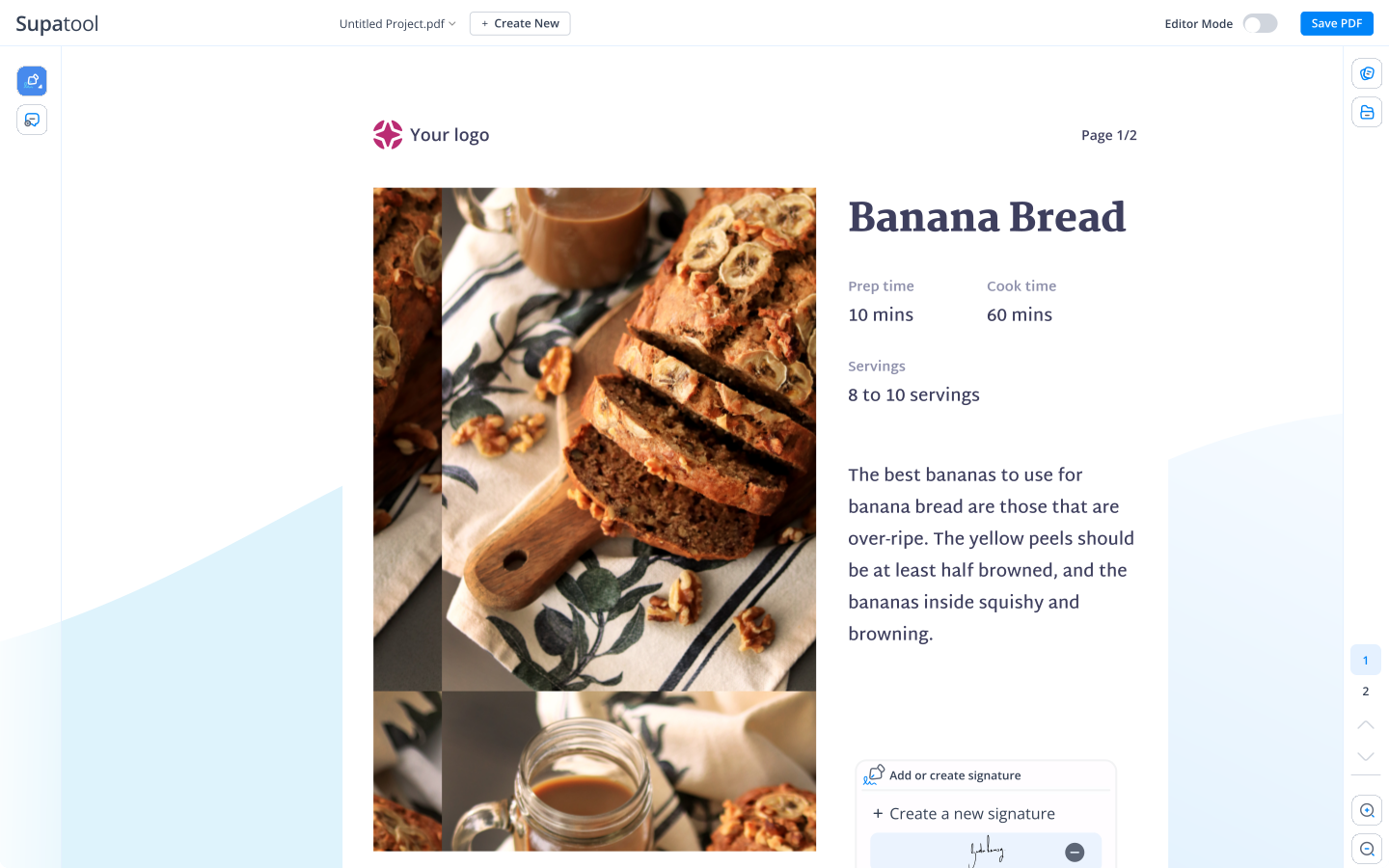
Get Documents Signed in 3 Simple Steps
Our electronic signature software makes document signing fast, secure, and legally binding
Upload Your Document
Upload any PDF or document that needs signatures. Our signature generator supports all common file formats.
Add Signature Fields
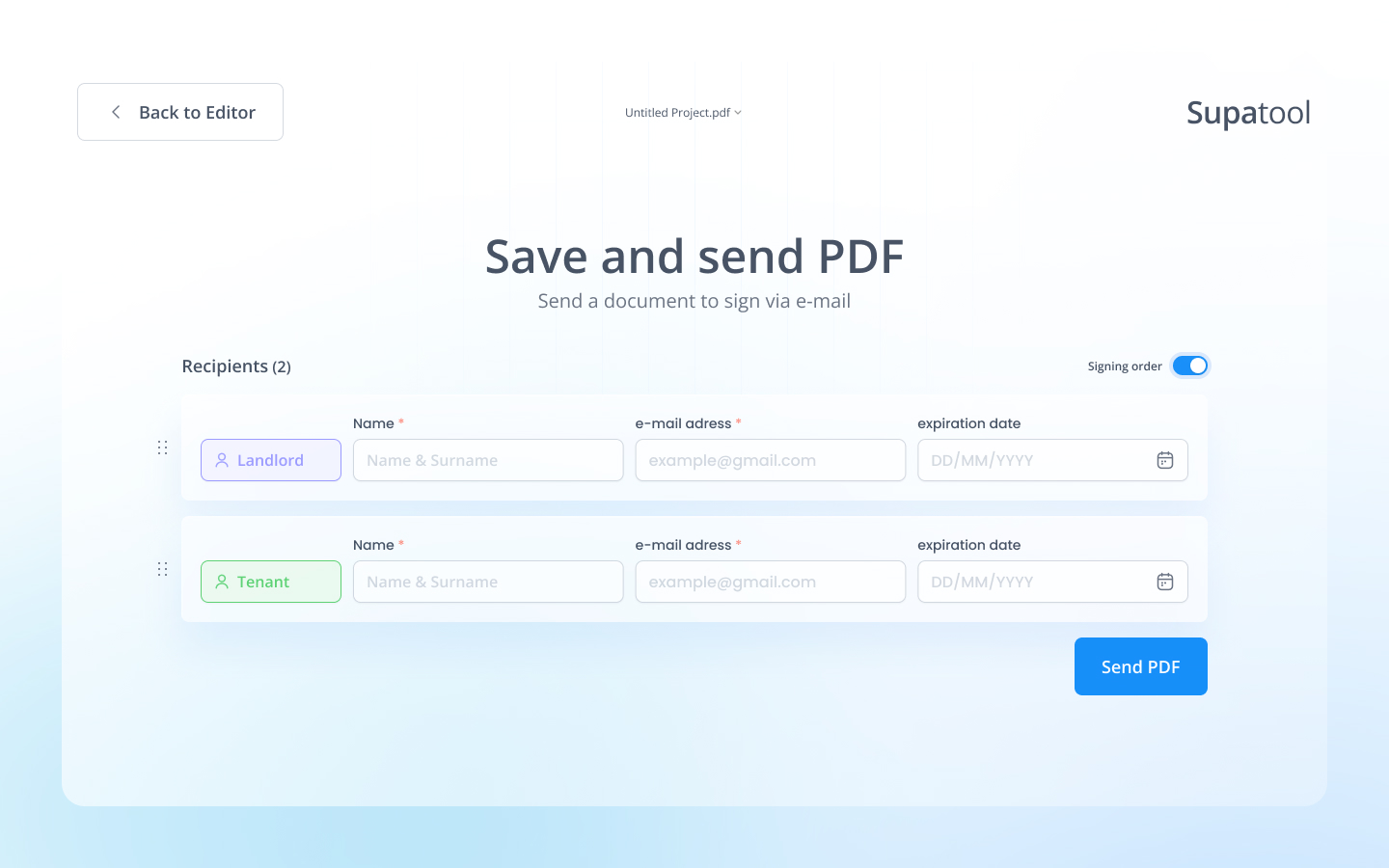
Drag and drop signature fields where signers need to sign. Add multiple signers and set signing order.
Send & Track
Send documents via email and track signing progress in real-time. Get notified when documents are signed.
Powerful eSignature Features
Everything you need in an electronic signature software
Easy Signature Collection
Collect electronic signatures quickly and securely with our intuitive signature generator. Our online signature generator makes it simple for signers to add their signature with just a few clicks, whether they're using a mouse, touchscreen, or stylus.
Legally Binding Documents
Create legally binding e-signature documents that comply with ESIGN Act, UETA, and eIDAS regulations. Our electronic signature software ensures your documents are court-admissible and meet all legal requirements for electronic signatures.
Feature illustration
Template Library
Get started quickly with our extensive library of e-signature document templates. Customize any template to match your brand and workflow needs. From contracts to consent forms, our signature creator has templates for every use case.
Multi-Party Signing
Send documents to multiple signers in any order you specify. Track signing progress in real-time and receive notifications when each party completes their signature. Our esignature generator supports complex signing workflows with ease.
Feature illustration
Advanced Security
Protect your documents with bank-level encryption, audit trails, and tamper-evident technology. Every signature includes a complete audit log showing who signed, when, and from where. Our electronic signature generator prioritizes security at every step.
Feature illustration
Mobile-Friendly Signing
Sign documents on any device, anywhere. Our mobile-optimized signature generator works seamlessly on smartphones and tablets, making it easy for signers to complete documents on the go without downloading apps.
Feature illustration
Build Once. Send Multiple Times.
Create and customize your ideal document once and send it as many times as you need. Just add your desired fields, assign signer roles, and collect signatures with ease. Save time with our flexible signature creator and reusable templates.
Start Your Free TrialUpgrade Your E-Signing Process with Powerful Automation
Automate your e-signing process from start to finish. Add your documents and signers to an approval flow — then instantly upload the signed documents to your cloud storage account with our powerful online signature generator. Set up signing orders, reminders, and automated workflows.
- Automated signing workflows
- Cloud storage integrations
- Automated reminders and notifications
- Custom signing orders
Automation workflow illustration
Document sharing illustration
Automate Document Sharing
Send your documents to signers via email, share it by copying and pasting a link, or embed it in your website so users can sign it anytime. Our electronic signature software gives you multiple flexible options to get documents signed quickly.
- Email document links directly to signers
- Share via secure, shareable links
- Embed signing forms on your website
- QR code sharing for mobile signers
Perfect for Every Industry
Our electronic signature software works for businesses of all sizes and industries
Healthcare
HIPAA-compliant patient consent forms, medical releases, and treatment agreements.
Real Estate
Lease agreements, purchase contracts, and property disclosure forms.
Education
Enrollment forms, permission slips, and academic agreements.
Business
Contracts, NDAs, employment agreements, and vendor forms.
Get Started with Ready-Made Templates
Choose from hundreds of professional e-signature document templates
Employment Contracts
Professional employment agreements and offer letters
NDAs & Agreements
Non-disclosure agreements and confidentiality contracts
Consent Forms
Medical, educational, and general consent forms
Legally Binding & Court-Admissible
Our electronic signatures comply with major e-signature laws worldwide
E-SIGN Act
Compliant with U.S. Electronic Signatures in Global and National Commerce Act
UETA
Meets Uniform Electronic Transactions Act standards
eIDAS
EU Electronic Identification, Authentication and Trust Services compliant
All signatures include complete audit trails with timestamps, IP addresses, and authentication records
Start Your Free TrialWorks with Your Favorite Tools
Integrate our electronic signature software with the apps you already use
Trusted by popular companies you know
Connect with Google Drive, Dropbox, Salesforce, Zapier, and 100+ more integrations
View All IntegrationsSimple, Transparent Pricing
Choose the plan that's right for your electronic signature needs
Starter
$ 15 /month/user
Billed annually
Ideal for freelancers, startups, and smaller teams
We only bill you for employees. Invite guests/clients for free.
- Pay-per-user pricing
- Unlimited projects
- 500 GB storage space
- 24/7/365 customer support
- Purchase optional upgrades
- Month-to-month billing
Business
$ 299 /month
Billed annually
Top-of-the-line, all-inclusive fixed pricing. Best fit for fast growing businesses
Your whole organization for one fixed price. Every feature & upgrade.
- Fixed price no per-user charges
- Unlimited users
- Unlimited projects
- 5 terabytes storage space
- Priority 24/7/365 customer support
- Extended 60-day free trial
Enterprise
Custom
Billed annually
Suitable for Enterprise solutions
Custom pricing for your organization's needs.
- All Business Features
- Unlimited custom domains
- Unlimited storage
- 99.99% Uptime SLA
- SCIM Integration
- Dedicated Account Manager
Ready to Get Started?
Start collecting electronic signatures today with our powerful eSignature software. Try it free with no credit card required.
Frequently Asked Questions
Everything you need to know about our electronic signature software
What is the best eSignature software?
The best eSignature software depends on your specific needs, but Supatool offers a comprehensive solution that combines ease of use with powerful features. Our electronic signature software provides legally binding signatures, advanced security features, seamless integrations, and an intuitive interface that requires no technical expertise. We offer flexible pricing plans suitable for individuals, small businesses, and enterprises. With features like template libraries, multi-party signing workflows, real-time tracking, and mobile optimization, Supatool stands out as a top choice for businesses looking to streamline their document signing processes while maintaining legal compliance and security standards.
Is there a free eSignature program?
While Supatool doesn't offer a permanent free plan, we provide a comprehensive free trial that allows you to fully experience our electronic signature software before committing. During your trial period, you'll have access to all premium features including unlimited signatures, advanced signature generator tools, template library, multi-party signing, and priority support. This gives you the opportunity to test our platform with your actual documents and workflows. After your trial, we offer flexible pricing plans starting at affordable rates that scale with your business needs. Our goal is to provide the best value for businesses serious about streamlining their document signing processes.
How do I write my signature electronically?
Writing your signature electronically with Supatool is simple and straightforward. When you receive a document for signature, you'll be prompted to sign it. You can create your electronic signature in three ways: draw your signature using your mouse or touchscreen, type your name and choose from various signature fonts, or upload an image of your handwritten signature. Our signature generator guides you through the process step-by-step. Once you've created your signature, you can save it for future use, making subsequent signings even faster. The entire process takes just seconds, and your signature will be securely attached to the document with a complete audit trail.
How do I create a digital signature on my computer?
Creating a digital signature on your computer with Supatool is quick and easy. When you need to sign a document, our electronic signature software will prompt you to create your signature. You can draw it using your mouse or trackpad, type your name and select a signature style, or upload a scanned image of your handwritten signature. Our signature creator provides tools to adjust the size, position, and appearance of your signature. Once created, you can save your signature for future use, so you won't need to recreate it each time. The signature is then cryptographically secured and attached to your document, ensuring it's tamper-evident and legally binding.
Can I write my name as digital signature?
Yes, absolutely! You can use your typed name as a digital signature with Supatool's electronic signature software. Our signature generator offers multiple font styles that transform your typed name into a professional-looking signature. Simply type your name, select from various signature fonts like cursive, formal, or casual styles, and your name will be formatted as a signature. This method is particularly useful if you don't have access to a touchscreen or prefer a consistent signature appearance. While typed signatures are legally valid in most jurisdictions, some documents may require a more personalized signature style. Our platform gives you the flexibility to choose the signature method that works best for your needs.
Can I make digital signature myself?
Yes, you can easily create a digital signature yourself using Supatool's online signature generator. Our platform provides multiple options: you can draw your signature freehand using your mouse, trackpad, or touchscreen; type your name and choose from various signature fonts; or upload an image of your handwritten signature. The process is intuitive and requires no technical skills. Once you've created your signature, you can save it to your account for future use, making it even more convenient for subsequent document signings. Our electronic signature creator guides you through each step, ensuring your signature looks professional and is properly formatted for legal documents.
What is the difference between eSignature and digital signature?
While the terms are often used interchangeably, there are technical differences between eSignatures and digital signatures. An eSignature (electronic signature) is a broad term that refers to any electronic process indicating agreement to a document, such as clicking 'I agree,' typing your name, or drawing a signature. A digital signature is a specific type of eSignature that uses cryptographic technology to create a unique digital fingerprint, ensuring the document hasn't been altered and verifying the signer's identity. Supatool's electronic signature software uses advanced cryptographic methods, making our eSignatures technically digital signatures. This means your documents are tamper-evident, include complete audit trails, and meet the highest security and legal standards for electronic document signing.
Should I use my full name in my signature?
Using your full name in your electronic signature is generally recommended for legal and professional purposes. Full names provide better identification and can help prevent disputes about who signed the document. However, the specific requirements depend on the type of document and your jurisdiction's laws. For formal contracts, legal documents, and business agreements, using your full legal name is typically the safest choice. For less formal documents or internal communications, your first and last name may be sufficient. Supatool's signature generator allows you to create signatures using your full name, initials, or any combination you prefer. Our platform ensures that regardless of the name format you choose, your signature will be legally binding and include proper authentication.
What are the types of electronic signatures?
Electronic signatures come in three main types, each with different levels of security and legal weight. Simple eSignatures include basic methods like typed names, checkboxes, or scanned images, suitable for low-risk documents. Advanced eSignatures use identity verification methods and are linked to the signer, making them more secure and legally stronger. Qualified eSignatures are the highest level, requiring a digital certificate from a qualified trust service provider and meeting strict regulatory standards. Supatool's electronic signature software provides advanced eSignature capabilities with identity verification, audit trails, and cryptographic protection. Our platform ensures your signatures meet legal requirements while remaining user-friendly, making it suitable for everything from simple consent forms to complex legal contracts.
What is the cost of a digital signature?
The cost of digital signatures varies depending on the service provider and features you need. Supatool offers flexible pricing plans to suit different needs and budgets. We provide a comprehensive free trial that lets you experience all features before committing. Our paid plans start at affordable monthly rates and include features like unlimited documents, advanced workflows, custom branding, priority support, and integrations with popular business tools. Enterprise plans are available for organizations needing advanced security, dedicated support, and custom integrations. Compared to traditional paper-based signing processes, electronic signatures save significant time and money while improving security and compliance. Contact us for detailed pricing information tailored to your specific requirements.