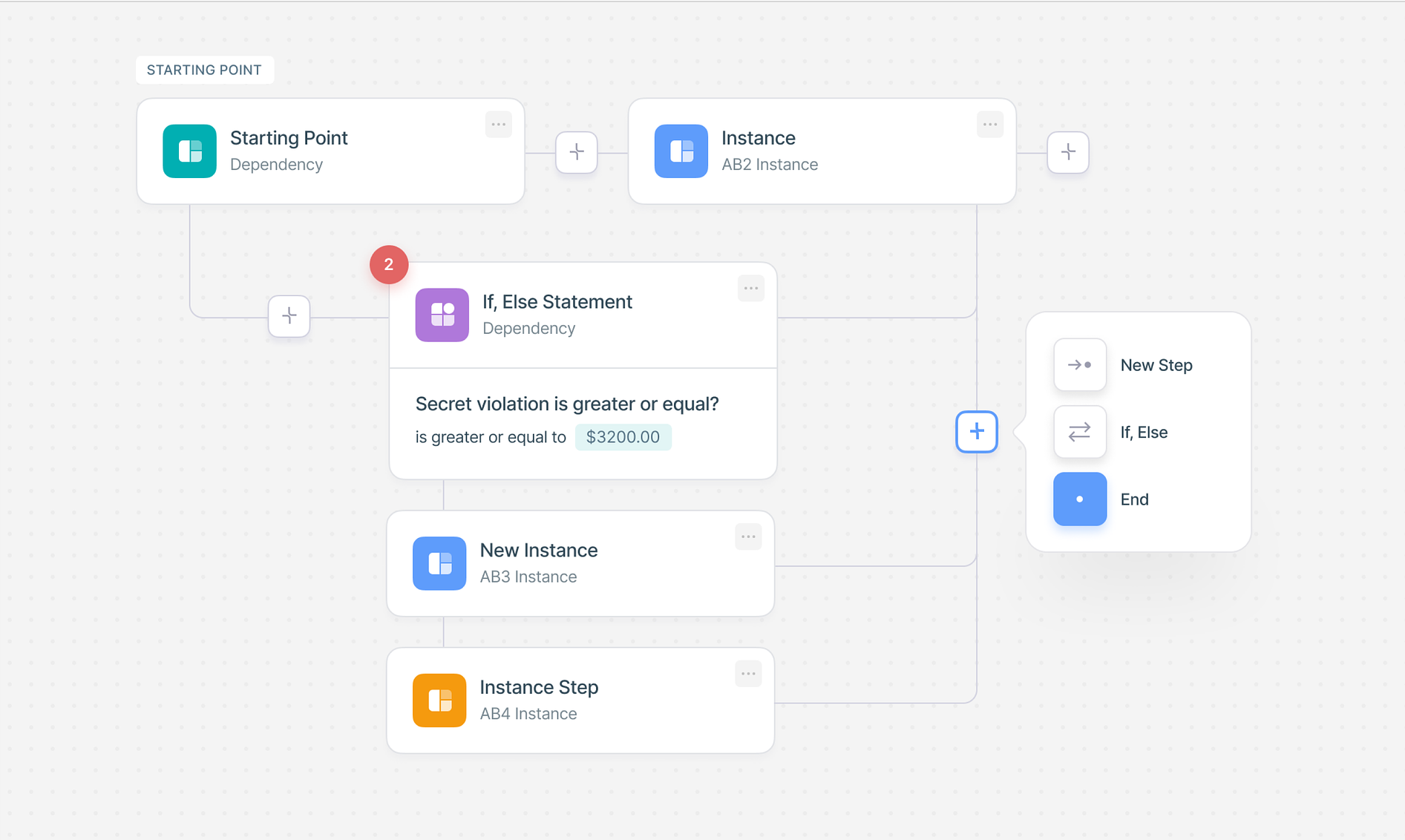
Online Conditional Logic Forms

Create intelligent forms with conditional logic that adapt based on user responses. Show or hide fields dynamically, create conditional fields, and build forms logic that improves user experience and increases completion rates.

Free Trial
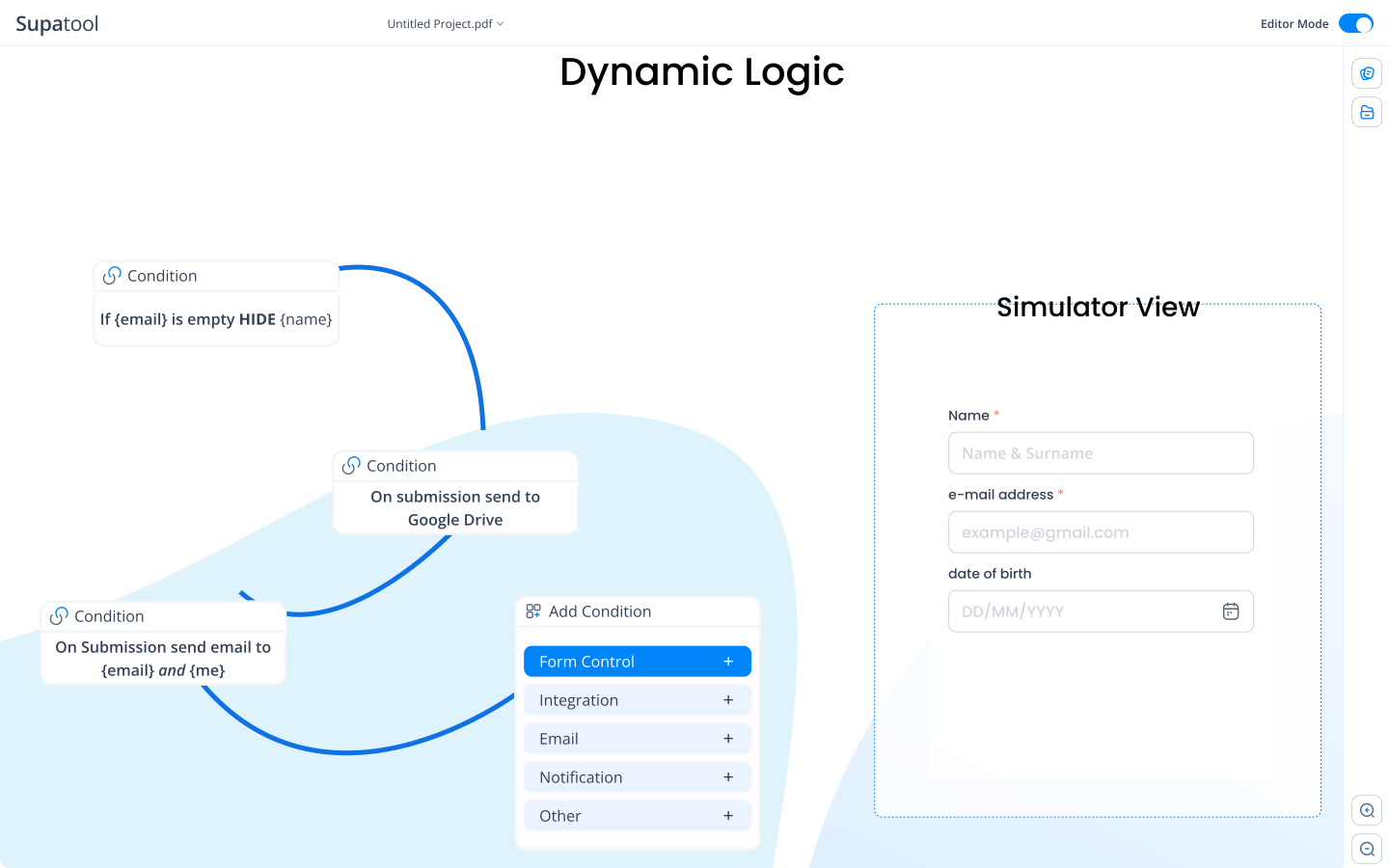
Conditional logic form screenshot showing dynamic fields

How to Create Forms with Conditional Logic

Follow these simple steps to build intelligent conditional logic forms

1

Design Your Form

Start by creating your base form with all necessary fields. Use our drag-and-drop builder to add text fields, dropdowns, checkboxes, and more.

2

Set Up Conditions

Define trigger conditions for each field. Specify which answers should show or hide other fields. Use simple rules or complex logic with AND/OR operators.

3

Test & Publish

Test all conditional paths to ensure your form logic works correctly. Preview from a user's perspective, then publish and start collecting responses.

Powerful Conditional Logic Features

Everything you need to build intelligent forms with conditional logic

Field Rules: Show and Hide Fields Dynamically

Create forms with conditional logic that automatically show or hide fields based on user responses. When someone selects a specific answer, relevant conditional fields appear instantly, creating a personalized experience. This form logic reduces clutter and helps users focus on what matters to them. Field rules enable you to display or conceal specific fields based on previous answers, ensuring users only see relevant questions.

  • Instant field visibility changes
  • Multiple trigger conditions
  • Smooth animations and transitions
  • Enable or require fields dynamically
Show and hide fields dynamically in conditional logic forms
Advanced conditional logic builder interface

Page Rules: Skip or Hide Entire Sections

In multi-page forms, page rules allow respondents to skip certain pages based on their inputs. This ensures users only navigate through pages relevant to them, enhancing efficiency and engagement. For example, if a user indicates they are not attending an event, the form can skip pages related to travel and accommodation details. Section logic controls the visibility of entire sections within a form, grouping related questions and displaying them only when relevant.

  • Skip irrelevant pages automatically
  • Show or hide entire sections
  • Personalized form journey
  • Reduce form abandonment

Form Rules: Conditional Actions & Automation

Form rules trigger specific actions upon form submission or based on user responses. Display custom messages, redirect users to particular URLs, send automated emails, trigger integrations, or deny submissions based on predefined criteria. Conditional actions automate workflows effectively, sending notifications, updating CRM systems, or routing submissions to the right team members automatically.

  • Automated email notifications
  • Custom redirects and success pages
  • Deny submission based on conditions
  • Trigger integrations automatically

Automated workflows

Dynamic calculations

Field-to-Field Comparison & Advanced Logic

Use field-to-field comparison to create dynamic form logic by comparing inputs between fields. This is particularly useful for validating data in real-time, ensuring password confirmation matches, verifying age requirements, or comparing dates. Combine multiple conditions using AND/OR operators to create complex rules that dictate form behavior. Advanced logic supports text matching, numeric ranges, date comparisons, and more.

  • Compare values between fields
  • Real-time validation
  • AND/OR operators for complex rules
  • Date, text, and numeric comparisons

Calculation Logic & Dynamic Pricing

Use calculation logic in your conditional forms to perform dynamic calculations based on field values. Calculate totals, scores, discounts, or any custom formulas. This form of logic enables dynamic pricing, scoring systems, and real-time value updates as users fill out your forms. Perfect for order forms, quote calculators, and assessment tools.

  • Real-time calculations
  • Custom formula support
  • Dynamic pricing and totals
  • Conditional discounts and scoring

Dynamic calculations

Visual formatting options

Conditional Formatting & Visual Feedback

Apply conditional formatting to your forms logic to change field appearance based on user input. Highlight important fields, show validation states, or provide visual feedback. This enhances the user experience and makes your conditional logic forms more intuitive and professional. Dynamically enable or require fields based on conditions, ensuring users provide necessary information at the right time.

  • Dynamic styling changes
  • Visual validation feedback
  • Color-coded field states
  • Enable/disable fields conditionally

Conditional Logic Form Templates

Get started quickly with pre-built templates featuring conditional logic

Event Registration

Event Registration Form

Collect attendee information with conditional fields for dietary preferences, accommodation needs, and special requirements based on event type selection.

Job Application

Job Application Form

Dynamic application forms that show relevant experience sections, skills, and qualifications based on the selected job role and position level.

Customer Survey

Customer Feedback Survey

Intelligent surveys with conditional logic that ask follow-up questions based on initial ratings and feedback categories selected by respondents.

E-commerce

Product Order Form

Conditional forms that display shipping options, product customization fields, and add-ons based on selected products and delivery preferences.

Healthcare

Patient Intake Form

Medical forms with conditional logic showing relevant health questions, medication fields, and symptom checklists based on patient history selections.

Education

Course Registration

Educational forms that display course-specific questions, prerequisite information, and scheduling options based on program and course selections.

Integrations

Connect your conditional logic forms with 100+ popular tools and services

Integrations with various third-party services

Integrate your conditional forms with CRM systems, email marketing tools, payment processors, analytics platforms, and more. Automate workflows and sync data seamlessly.

View All Integrations

Simple Pricing

Choose the plan that works for you. All plans include conditional logic features.

Starter

$ 15 /month/user

Billed annually

Ideal for freelancers, startups, and smaller teams

We only bill you for employees. Invite guests/clients for free.

  • Pay-per-user pricing
  • Unlimited projects
  • 500 GB storage space
  • 24/7/365 customer support
  • Purchase optional upgrades
  • Month-to-month billing
Popular

Business

$ 299 /month

Billed annually

Top-of-the-line, all-inclusive fixed pricing. Best fit for fast growing businesses

Your whole organization for one fixed price. Every feature & upgrade.

  • Fixed price no per-user charges
  • Unlimited users
  • Unlimited projects
  • 5 terabytes storage space
  • Priority 24/7/365 customer support
  • Extended 60-day free trial

Enterprise

Custom

Billed annually

Suitable for Enterprise solutions

Custom pricing for your organization's needs.

  • All Business Features
  • Unlimited custom domains
  • Unlimited storage
  • 99.99% Uptime SLA
  • SCIM Integration
  • Dedicated Account Manager

Ready to build conditional logic forms?

Start building intelligent forms with conditional logic today. Create dynamic, personalized experiences that adapt to your users.

Frequently Asked Questions

Everything you need to know about conditional logic forms

What are conditional logic forms?

Conditional logic forms are intelligent, dynamic forms that adapt based on user responses. When a user selects a specific answer or fills in a particular field, the form automatically shows or hides relevant fields, questions, or sections. This creates a personalized experience where users only see questions that are relevant to their specific situation. For example, if someone selects 'Yes' to having a pet, additional questions about pet type, name, and care might appear. Conditional logic forms improve user experience by reducing form length, increasing completion rates, and collecting more accurate data. They're essential for complex surveys, applications, registrations, and any form where user responses determine what information needs to be collected next.

What are the different types of conditional logic?

There are several types of conditional logic you can implement in forms. Field Rules show or hide specific fields based on previous answers. Page Rules allow users to skip entire pages in multi-page forms. Form Rules trigger actions like emails, redirects, or deny submissions based on conditions. Section Logic controls visibility of entire sections. Calculation Logic performs mathematical operations based on field values. Field-to-Field Comparison validates data by comparing inputs between fields. Advanced conditional logic uses AND/OR operators for complex rules with date comparisons, text matching, and numeric ranges. Enable/Require Logic dynamically sets fields as enabled, disabled, required, or optional. Each type serves different purposes: field rules personalize experiences, page rules speed up completion, form rules automate workflows, and calculation logic enables dynamic pricing or scoring systems.

What are examples of conditional forms?

Conditional forms are used across many industries and scenarios. Event registration forms might show dietary preference fields only if someone selects 'attending.' Job application forms can display relevant experience sections based on selected job roles. E-commerce checkout forms might show shipping address fields only for physical products. Healthcare forms can reveal medication questions based on medical history selections. Survey forms often use conditional logic to ask follow-up questions only when relevant. Customer feedback forms might show different satisfaction questions based on initial ratings. Insurance forms commonly use conditional logic to display coverage options based on selected policy types. Educational forms can show course-specific questions based on program selection. The key is that conditional forms adapt to each user's unique situation, making data collection more efficient and user-friendly.

What are some common mistakes with conditionals?

One common mistake is creating circular dependencies where field A depends on field B, which depends on field A, causing logic conflicts. Another issue is forgetting to account for all possible answer combinations, leaving some users unable to complete forms. Over-complicating logic with too many nested conditions makes forms hard to test and maintain. Not testing all conditional paths thoroughly leads to broken user experiences. Using vague or ambiguous conditions that don't clearly define when fields should appear causes confusion. Failing to provide clear visual indicators when fields appear or disappear can disorient users. Creating conditions that are too restrictive prevents users from providing necessary information. Not considering mobile users who might have different interaction patterns. Finally, not documenting conditional logic makes it difficult for team members to understand and modify forms later.

How to make a form with conditional logic?

To create a form with conditional logic, start by mapping out all possible user paths and identifying which fields depend on others. Use a form builder that supports conditional logic features, like Supatool. Begin by creating your base form with all necessary fields. Then, access the conditional logic settings for each field you want to make conditional. Define the trigger conditions - specify which field and what value should trigger the action. Choose the action type: show, hide, require, or skip. Set up multiple conditions if needed using AND/OR logic. Test each conditional path thoroughly by filling out the form with different answer combinations. Preview the form from a user's perspective to ensure the flow feels natural. Consider edge cases and ensure all users can complete the form regardless of their answers. Finally, publish and monitor form completion rates to identify any issues with your conditional logic setup.

How to do conditional formatting in forms?

Conditional formatting in forms allows you to change the appearance of fields based on user input or conditions. Start by selecting the field you want to format conditionally. Access the field's formatting or styling options. Define the condition that triggers the formatting change - this could be based on field value, user type, date, or other criteria. Choose what formatting to apply: background color changes, text color modifications, border styling, font weight adjustments, or icon additions. For example, you might make a field's background green when a valid email is entered, or highlight required fields in red when left empty. Some form builders allow conditional formatting based on calculations or comparisons between fields. You can also apply formatting to entire sections based on conditions. Always ensure formatting changes are accessible and don't rely solely on color to convey information. Test conditional formatting across different devices and browsers to ensure consistent appearance.